Be Good & Do Good!

Year: 2010 (Page 4 of 8)

How to Deep Link to a Specific Point in a YouTube Video

There are hundreds of videos on YouTube which contain valuable best practice content. To help surface the golden nuggets here are three ways to deep link to specific places within the video.

1. Create a link to a specific part in a YouTube video

If you want to link to a specific part of a video on YouTube, you can. For example,
http://www.youtube.com/watch?v=PjDw3azfZWI#t=31m08s

Notice the “#t=31m08s” on the end of the url? That link will take you 31 minutes and 8 seconds into that video. Linking to a particular minute and second can be really helpful — for example, that link takes you straight to where someone asks Eric Schmidt a question about Twitter. From there, you can listen to his answer, where he says (among other things): “We’re in favor of all of these new communications mechanisms. ….”

2. Start an embedded YouTube at a certain timestamp

To do it on an embedded video, use the “start” parameter. Note that start takes seconds as a parameter, not minutes and seconds. For example, to start an embedded video 31 minutes and 8 seconds into a video, 31*60+8 = 1868 seconds, so you would use this code:
<object width=”640″ height=”385″><param name=”movie” value=”http://www.youtube.com/
v/PjDw3azfZWI&hl=en_US&start=1868″></param><param name=
“allowscriptaccess” value=”always”></param><embed src=”http://www.youtube.com
/v/PjDw3azfZWI&hl=en_US&start=1868″ type=”application/x-shockwave-flash” allowscriptaccess=”always” width=”640″ height=”385″></embed><
/object>

3. Use annotations to create links within your videos

Read more on how to create and use annotations at http://www.youtube.com/watch?v=CDsLSFKwgFI

How to export data to CSV file/text file using Apex

Problem Statement
I want to export list of object into CSV file using Apex

Solution

<apex:page controller="csvController" cache="true" 
contentType="text/csv#filename.csv" language="en-US">
"Col A","Col B","Col C","Col D"
<apex:repeat value="{!myList}" var="a">
"{!a.ColA}","{!a.ColB}","{!a.ColC}","{!a.ColD}"
</apex:repeat>
</apex:page>

Please note that

  • With the #filename.csv, it prompts the user to save/open the file. Otherwise, it loads into the browser as html
  • You’ll also have to format the VF page as a clean csv text file, that means no pageblocktables or anything that might insert html formatting.
  • if customer want to export data object to text file use contentType=”text/plain”

Source : Salesforce Community

Indian company to create call center jobs in the US

There is one word used over and over again in India to describe JustDial

http://tctechcrunch.files.wordpress.com/2010/03/mani_just_dial_01.jpg?w=300&h=199

The idea is simple: You call up and within the first ring a real person picks up the phone, you ask them for any business listing – in any category – and within 45 seconds they email or text you the information or, if you prefer, connect the call.

The company will end its fiscal year at the end of March with some $32 million in revenues having answered 72 million calls in the last year. That call volume is increasing by 40%, so the company expects to break 100 million calls in the next year. In a country where nearly everyone has a mobile phone but just 50 million people have Internet access, JustDial is essentially Google and 411 rolled together.

The move is a direct volley at a service like GOOG-411, which has opted to do the same thing, but using voice recognition software. But Founder and CEO V.S.S. Mani (pictured above, in one of his call centers) is betting that nothing beats a human voice with a quick answer.

For now, JustDial’s US operations will be handled out of India, where the company employs some 4,000 people but, in a twist to the direction most call center jobs are flowing, Mani plans to hire up big in the US—up to 1,000 people mostly in under-employed, rural areas. “We need a big presence in the US very soon,” Mani says. That right– an Indian company will be creating call center jobs in the US

Smart GMail – Did you mean to attach files?

Today one of my friend noted a really unnoticed yet creative behavior of GMail. He tried to send an email with body containing “please find attached ….” and he clicked send, GMail instead of sending that email popped-up a message

Did you mean to attach files? You wrote “find attached” in your message, but there are no files attached. Send anyway?

This alerted him that he missed on attaching the files.

Isn’t that really smart and creative thinking! Though a minute thing, but such small things of intelligence makes GMail (Google) an innovator at email services.

Cheers Google!

Ability to create alias for field labels across Profiles

Problem Statement
We have users in multiple countries and different vernacular for the same entity. Is it possible to create an alias for a record type that displays for users with a specific profile so we can use the same record types and records, yet have the customization between different countries? It’s almost like using translations, but it’s all within the English language.

Example: Record Type “Municipality” vs. “Local Authority” for same records
Everyday users see Municipality
UK users see Local Authority

Possible Solutions

Terrence: Look at the new Translation Workbench feature. The Translation Workbench allows you to create translations for the customizations you’ve made to your Salesforce.com organization. Everything from custom picklist values to custom fields can be translated so your global users can use all of Salesforce.com in their language.
Go to Setup | Admin Setup | Translation Workbench.

Tom: You may also be able to utilize the Tags function. Setup / Customize / Tags.
This would enable each user to “tag” the field with the name that they are comfortable with. That would help them with the different names in different areas.

Paul: Unfortunately I don’t see how either of these options will work. The translation workbench does not specify English and English (UK) as two different languages, and I imagine if you set someone’s language to another language like Spanish then all of the standard tabs and fields are in that language. I don’t see how to change the translations for standard tabs and fields in the workbench.

The tag feature is for tagging records, it does not allow you to tag fields, and it has to be done for each record.

I think you have two options:

One option is just to make all the fields have both names, like State/Province. In your example just rename the field Municipality/Local Authority. You can even rename standard fields under Setup > Customize > Tab Names and Labels. RECOMMENDED Solution

Your other option is to create two fields for each one that you want to modify. Setup a workflow rule or trigger that automatically updates the matching field whenever it’s entered. Then create two different page layouts that are used based on the user’s profile (so UK users would have to have a different profile from US users).

Depending on the number of fields that you’re talking about, the second one could get really complicated.

Discussion @ Salesforce Linked In

YUI Library – The transparent mask turns black in IE 8

Problem Statement
I use the YUI dialog in my project and turn on the “modal”, the initializing code looks like:

document.mainDialog = new YAHOO.widget.Dialog("mainPanel",
{ modal: false,
width: "89em",
height: "30em",
fixedcenter: true,
visible: false,
constraintoviewport: true
});

The modal works fine in IE 7.0 and Fireforx 3.0, it generates a transparent mask to prevent activating any elements in the document before closing the modal. But in IE 8.0, the transparent mask turns to “black”, rather than “transparent”.

Solution
The cause is that IE8 does not support the CSS3 ‘opacity’ selector. But YUI uses this to style the mask as follows:

.yui-skin-sam .mask {
background-color:#000000;
opacity:0.25;
}

To solve this problem – I have an IE specific stylesheet in which I override the above style as follows:

.yui-skin-sam .mask{
filter: alpha(opacity=30);
}

Read more about the bug @ YUI Library

Salesforce – FTP Integration (Data loader, Web service & HTTP)

Author : Chirag Mehta & Angelica Buffa

Using FTP servers to store and share files is very common now at days. Most language programs let you develop FTP clients and consume their services.

With Apex, there are three possible approaches to resolve the integration with this kind of file servers:

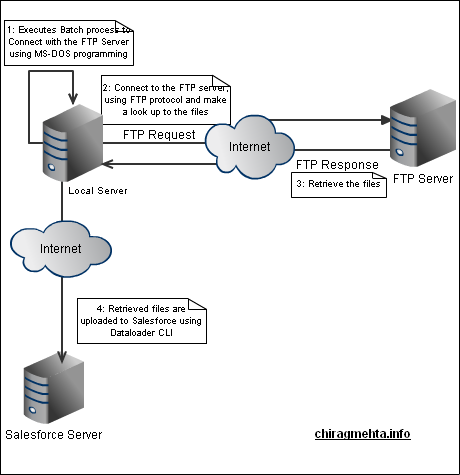
I – Data Loader CLI – Windows approach.

  1. Download Salesforce Data Loader Command Line Interface (Read more at http://wiki.developerforce.com/index.php/Using_Data_Loader_from_the_command_line)
  2. Write a Widows Batch file (.bat file)
  3. First command in the batch file will be connect to FTP server (ms-dos command ‘ftp’) and then get the necessary files from ftp server to the local folder.
  4. Second set of commands execute the Data Loader CLI jar and loads step3 retrieved file into Salesforce.
  5. To automate the execution of the batch, we can schedule the bat file execution using scheduled task feature of Windows operating system.

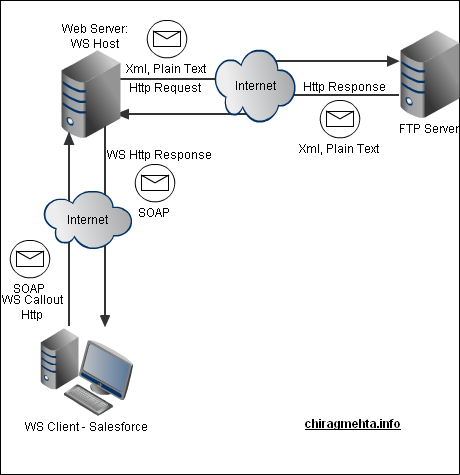
II – Java Web Service

  1. Write a Java FTP client, expose it as a Web Service
  2. Consume above WS into your Salesforce Org using Apex “Browse WSDL” functionality

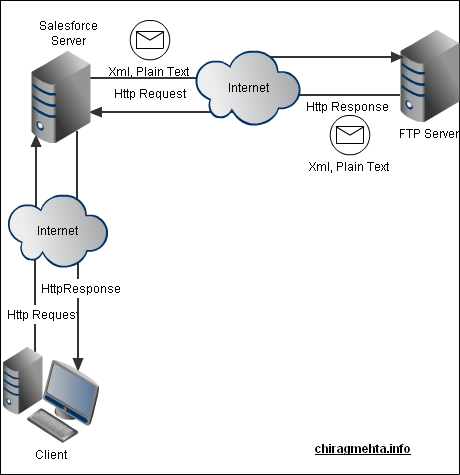
III – Http Request

  1. Create a Http Request to the FTP server
  2. Handle the response using either of HttpRequest and HttpResponse Apex Class
  3. Ps: The problem that you can face is the size of the files. Please remember that HTTP Request size are currently limited to 100Kb of data, so larger exports would fail unless a mechanism was created to utilize multi-part transmissions.

How to configure Lotus Connect & Single Sign-On in a CITRIX Env

From last few days, I have been exploring  to find out how to configure(implement) Salesforce Lotus Connect & Single Sign-On in a CITRIX environment. Salesforce Support when contacted provided a displeased reply …

Case Description

Please highlight step by step process on how to configure (implement) Lotus Connect and Single Sign-On in a CITRIX enviornment

Case Comment from Salesforce

Unfortunately we do not support citrix, so I may not be able to fully assist you with your case.

1. – Lotus Notes – I unfortunately do not have any information regarding the installation of connect for lotus notes in a citrix enviroment. If you consult the web boards at Developer.Force.Com and Community.Force.Com you may be able to find more information.

2. -SSO – We do have information regarding SSO, but we do not have any specifically designed for citrix. This is the information we have:
https://na1.salesforce.com/help/doc/en/salesforce_single_sign_on.pdf
https://na1.salesforce.com/help/doc/en/sso_about.htm

Any possible solutions or workarounds on how to configure Lotus Connect & SSO in a citrix env?

Use Google Maps on a secure(https) page

User Problem
I’m including a Google Map on a page where users can sign up for a service. The page is accessed via SSL, and before I included the map, the entire page was transmitted securely. Now, however, browsers complain that portions of the page (the map) are transmitted insecurely. I understand the user information is still secure, but my users probably won’t.

How can I change this page so that the google map is still available and users may still interact with it, but the entire page is delivered via SSL?

Google words ..

Previously, when a Google Map was embedded in an encrypted web page, users would get a pop-up message saying the page included both secure and non-secure content. No one likes pop-up messages and the extra clicks they require

Google Solution

The Google Maps JavaScript API V2, Google Static Maps API, Google Maps API for Flash, and Google Maps API HTTP services can be accessed over a secure (HTTPS) connection by Google Maps API Premier customers. If the Google Maps APIs are used with a free Maps API key on a secure site, the browser may warn the user about non-secure objects on the screen.

Other possible tweaks

The easiest way would be to proxy the connection to Google Maps. Depending on how much the user interacts with google maps, this may be really easy or a little annoying.

You can use an SSL proxy script. I did that with a client’s site which uses the Enterprise License, and the client’s Google representative confirmed for us that it is OK to do it this way. I’m not sure if it is OK to do it with the free license, but I assume it is OK too.

Use Firefox which only shows a warning in the status bar

Have a custom link or button on the page that opens the map in a separate window. In our case the users did not want to see the map all the time. Therefore, I have the link on the relevant page and they can click it to open the map when they wish. They will still see the warning but only when they have to look at the map and not every single time they load the account page.

Implement Yahoo Maps instead, which has a simple querystring-based API to pass a location in, and retrieve an XML document containing a URL to a map image. Users can’t pan/zoom, but it’s a simple compromise, they can click a button to open a full map.

« Older posts Newer posts »