Ye Meri Life Hai - Chirag Mehta

Be Good & Do Good!

Page 15 of 134

Mac Rumors – Apple developing FM Radio App for iPhone and iPod Touch?

9 to 5 Mac reports that it has received a tip claiming that Apple is in the process of developing an application to bring FM radio functionality to the iPhone and iPod touch. The functionality would reportedly be similar to that found in the fifth-generation iPod nano, which offers the ability pause radio and tag songs for use in iTunes.

The FM radio application will reportedly be able to function in the background to allow user to listen to radio stations while other tasks are being performed, although it remains unclear whether the radio functionality will be a standalone application or integrated into the existing “iPod” music application. The application will also reportedly extend song tagging capabilities to integrate direct iTunes Store purchasing.

The holdup on this app is that Apple is trying to integrate the Mobile iTunes Store purchases into the functionality of the program. For instance, if you like a song you are listening to on the radio (and that station supports tagging and you are in the US), you will be able to push a button and see the song (and all of the information around it) in the iTunes Mobile store.

The Broadcom combination Wi-Fi/Bluetooth chips used in the iPhone and iPod touch have long also had the technical capacity for FM radio reception, with the chip found in the latest iPod touch theoretically also capable of FM radio transmission, although Apple has not as yet taken advantage of these capabilities.
Salesforce – Visualforce / Apex Code Samples

Following is list of Apex/Visualforce code samples listed on Salesforce Wiki. These are collections of pieces of code that you think will be useful to us (Salesforce community). These are typically small (a few pages of Apex, or Apex and a few Visualforce pages, or a trigger or two) and one-off.

If you want to instead create or join a collaborative coding project, check out Salesforce Code Share

Source : Salesforce Wiki

Salesforce – Checkbox in DataTable

Displaying the check box in a data table or page block table is a general requirement in every project. with the help of wrapper class we can display the checkboxes in a data table. SrinivasaRao Pendala writes a simple and neat article on how to generate checkboxes in data table.

Also added in the code is small javascript so that if we select the header checkbox it will select all the checkboxes.

Read complete article @ Salesforce Wiki

About Friends, Friendship is not about …

Friendship is not about “I m sorry “ its about “abbe teri galti hai “

Friendship is not about “I m there for u “ its about “kahan marr gaya saale “

Friendship is not about “I understand “ its about “sab teri wajah se hua manhus“

Friendship is not about “I care for u “ its about “kamino tumhe chhod ke kahan jaunga “

Friendship is not about “I m happy for ur success “its about “chal party de saale“

Friendship is not about “I love that girl“ its about “saalo izzat se dekho tumhari bhabhi hain “

Friendship is not about “R u coming for outing tomorrow “ its about “ nautanki nahi, hum kal bahar ja rahe hai “

Friendship is not about “Get well soon “ its about “ Itna piyega toh yehi hoga“

Friendship is not about “All the best for ur career“its about “bahut hua, abhi toh switch mar saale“

What is Google Wave?

O’Reilly’s upcoming book Google Wave: Up and Running on Google Wave showcases

How a wave is structured?
How it works?
Also it details on Robots, Gadgets, Embedded Waves, Wavelets, Blips, threaded conversation model ….

So What Exactly Is Google Wave?

Google Wave is a real-time communication and collaboration platform that incorporates several types of web technologies, including email, instant messaging (IM), wiki, online documents, and gadgets. In more technical terms, Google Wave is a platform based on hosted XML documents (called waves) supporting concurrent modifications and low-latency updates.

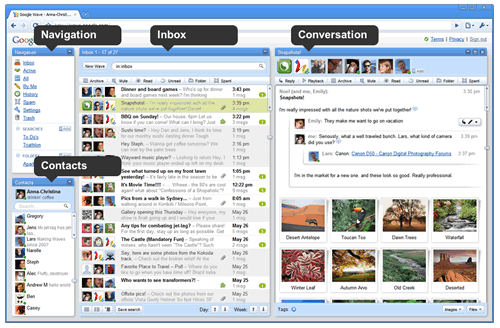
The Google Wave user interface includes panes that dynamically update with content as users interact with waves.

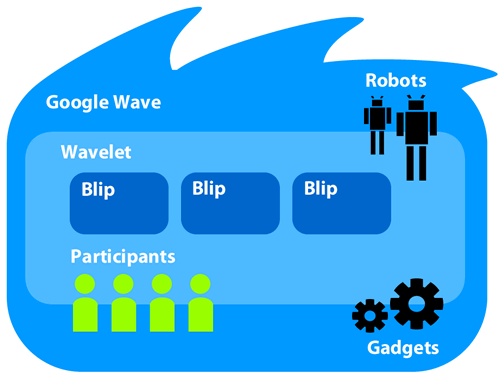
A general overview of how a wave is structured. Waves contain wavelets, which are containers for blips (messages) added by participants. Extensions, in the form of robots and gadgets augment the conversation between participants in a wave by adding different types of features and functionality to a conversation.

Google Wave

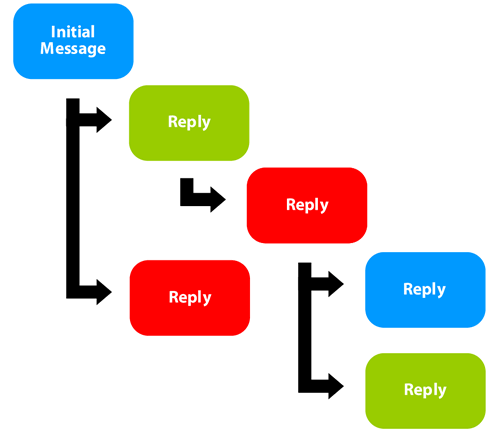
The threaded conversation model includes one or more threads based on replies to an initial message or replies to other replies.

Waiting for Google Wave Invite, check the invite post @ https://www.chiragmehta.info/chirag/2009/10/03/google-wave-preview-invitations/

Ready (Telugu Movie)

Rating : 8/10

Genre: Romantic Comedy

Plot : Preparing for her wedding, Pooja (Genelia D’Souza) returns home to visit her family in India, where she meets Chandu (Ram). The handsome college student immediately falls for her and refuses to let her betrothal stand in the way of his passion. Now all he has to do is convince Pooja and her family that he’s the right guy for her, despite a case of mistaken identity and a terrible misunderstanding that leads to an accidental kidnapping.

Really hilarious and non stop family based comedy. You will enjoy every moment.  Songs are also good and the best is cute lovely Genelia …. Love her … Genelia, I would love to date you .. lol ..

View the movie with English subtitles at

Happy Birthday Father Gandhi Ji ..

There is a name that profounds too big than anyone when we think of our freedom, India’s freedom. Though we are talking about freedom fighter but the irony is that this person is known for non violence or zero violence.

Simple, Zero violence, follower of Ahimsa principles … the none other than … my and entire India’s father .. Mahatma Gandhi.

Today we celebrate birthday of Gandhi, my hearty wishes to his soul.

I pray and wish that every individual on earth follows non-violence taught to us by reglious souls like Mahavira, Buddha and then practiced by leader like Gandhi.

Happy Birthday Gandhi Ji ..

Gandhiji

Salesforce – Hide standard buttons display

Below version isn’t working due to cross domain issues (As visualforce pages are served from *.force.com domain and salesforce standard pages are served from *.salesforce.com domain, so it results in cross domain errors).

Please read new working version @ https://www.chiragmehta.info/chirag/2010/08/16/salesforce-hide-standard-buttons-display-working-version/

There are many a times where we want to remove few standard buttons from page layout, but there is no such option to remove such restricted buttons. Few such buttons are …

  • “New Note” or “Attach File” button on Google Docs, Notes, & Attachments Related list
  • “Save & Send Invitation” button on New Event page
  • Following is a solution which will hide “Save & Send Invitation” button on New Event page

    STEP1: Visualforce Code

    <apex :page sidebar="false" showHeader="false">
    <script language="javascript" type="text/javascript">
    window.onload = new function()
    {
    window.parent.document.getElementsByName("sendEmail")[0].style.display = 'none';
    window.parent.document.getElementsByName("sendEmail")[1].style.display = 'none';
    }
    </script>

    </apex>

    STEP2: Create a Home Page Component of type (HTML Area)

    <iframe src="/apex/aboveVFPageName" frameborder="0" width="100%" height="100"></iframe>

    STEP3: Add above created Home page component in your home page layout.

    That’s it you are all set, now open New Event and add invitees, automatically the “Save & Send Invitation” button will disappear.

    Algorithm for converting 15 digit Salesforce Id to 18 digit

    Following is an algorithm I found on Salesforce Community. It converts a 15 digit salesforce Id to the corresponding 18 digit Salesforce Id. This is pretty helpful in onclick JavaScript codes and S-Controls where merge fields normally return only 15 digits. Also, although the code is in JavaScript, it can be easily converted to any other coding language code.

    function normaliseSforceID( id) { // fluff up a 15 char id to return an 18 char id
    if (id == null) return id;
    id = id.replace(/\"/g, ''); // scrub quotes from this id
    if (id.length != 15) {
    //print('well, id is not 15, bye' + id + ' ' + id.length);
    return null;
    }
    var suffix = "";
    for (var i = 0; i < 3; i++) { var flags = 0; for (var j = 0; j < 5; j++) { var c = id.charAt(i * 5 + j); if (c >= 'A' && c < = 'Z') { flags += 1 << j; } } if (flags <= 25) { suffix += "ABCDEFGHIJKLMNOPQRSTUVWXYZ".charAt(flags); } else { suffix += "012345".charAt(flags-26); } } return id + suffix; }

    « Older posts Newer posts »