Ye Meri Life Hai - Chirag Mehta

Be Good & Do Good!

Search results: "ki" (page 1 of 57)

Salesforce – Hide standard buttons display (Working version)

There are many a times where we want to remove few standard buttons from page layout, but there is no such option to remove such restricted buttons. Few such buttons are …

  • “New Note” or “Attach File” button on Google Docs, Notes, & Attachments Related list
  • “Save & Send Invitation” button on New Event page
  • Following is a solution which will hide “Save & Send Invitation” button on New Event page

    STEP1: JAVASCRIPT Code. Create a JS file with below code

    function hideBtns()
    {
    if(document.getElementsByName(“sendEmail”)[0]!=null)
    document.getElementsByName(“sendEmail”)[0].style.display = ‘none’;
    if(document.getElementsByName(“sendEmail”)[1]!=null)
    document.getElementsByName(“sendEmail”)[1].style.display = ‘none’;
    }
    if (window.addEventListener) {
    window.addEventListener(“load”, hideBtns, false);
    }
    else if (window.attachEvent) {
    window.attachEvent(“onload”, hideBtns);
    }

    STEP2: Upload the JS file as a DOCUMENT

    STEP3: Create a Home Page Component of type (HTML Area)

    <script src=”/servlet/servlet.FileDownload?file=01530000001OcDl”></script>

    Here 01530000001OcDl is ID of document created in STEP2

    STEP4: Add above created Home page component in your home page layout.

    That’s it you are all set, now open New Event and add invitees, automatically the “Save & Send Invitation” button will disappear.

    Please note : If you have some functionality which you want to work across all pages or on every form then navigate to Setup then go to Customize->User Interface, check “Show Custom Sidebar Components on All Pages” under the Sidebar section.

    Google Plunges Into Social Networking – Google Buzz

    Buzz URL : http://www.google.com/buzz

    http://www.google.com/s2/static/images/1444417344-GoogleBuzzLogo68.png

    Google and Facebook are on a collision course in the increasingly competitive market for social networking services.

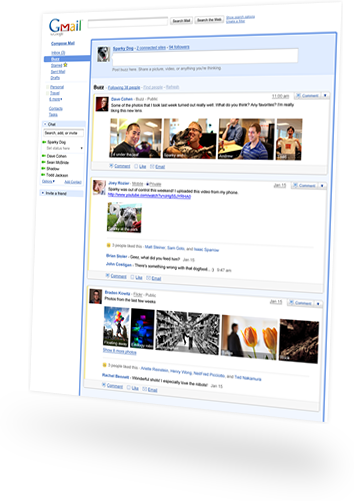
    On Tuesday, Google introduced a new service called Google Buzz, a way for users of its Gmail service to share updates, photos and videos. The service will compete with sites like Facebook and Twitter, which are capturing an increasing percentage of the time people spend online.

    The links shared on those social networks are also sending a growing amount of traffic to sites across the Web, potentially weakening Google’s position as the prime navigation tool on the Internet.

    Separately, Facebook plans to announce on Wednesday that it is improving the live chat service on its site by allowing it to be integrated into other services like AIM, AOL’s instant messaging network, which is among the most popular in the United States.

    Buzz is Google’s boldest attempt to build a social network that can compete with Facebook and Twitter. The service is built into Gmail, which already has 176 million users, according to comScore, a market research company. And Buzz comes with a built-in circle of friends, a group that is automatically selected by Google based on the people that a user communicates with most frequently in Gmail and on Google’s chat service.
    Google Buzz

    Like other social services, Buzz allows users to post status updates that include text; photos from services like Google’s Picasa and Yahoo’s Flickr; videos from YouTube; and messages from Twitter. Analysts say many of its features mimic those of Facebook.

    It is a direct challenge to Facebook, in particular,” said Jeremiah Owyang, a social media analyst with the Altimeter Group.

    Still, Buzz faces a struggle against Facebook, which recently announced, on the occasion of its sixth birthday, that it had 400 million users. Buzz also risks further overwhelming people who are struggling with Web services that generate ever-increasing amounts of information.

    But Google executives said that, on the contrary, Buzz would help tackle the problem of information overload, as Google would apply its algorithms to help people find the information most relevant to them.

    The stream of messages has become a torrent,” Bradley Horowitz, vice president for product development at Google, said in an interview. “We think this has become a Google-scale problem.”

    Sergey Brin, a Google co-founder, said that by offering social communications, which have primarily been used for entertainment purposes, Buzz would bridge the gap between work and leisure.

    Bridging those two worlds is very powerful,” Mr. Brin said at a press conference, adding that he had used Buzz to help him write an Op-Ed article for The New York Times by soliciting input from other Google employees.

    Google has also woven Buzz into mobile phones, through a mobile Web site and a Google mapping application. Users will be able to see updates that friends have posted from particular spots.

    Read complete story @ http://www.nytimes.com/2010/02/10/technology/internet/10social.html

    HTML Email Tracking in Salesforce

    Outbound HTML emails are tracked by default if your organization uses HTML email templates. You can select or deselect this setting at Setup | Customize | Activities | Activity Settings to control email tracking. If you disable email tracking, email tracking information for your organization is no longer stored. However, the HTML Email Status related list remains on page layouts and email tracking reports remain on the Reports tab.

    After sending an HTML email, you can track the date it was first opened, the number of times it was opened, and the date it was most recently opened.

    Salesforce AJAX Toolkit Shell

    Came across something tweak toolkit installed and accessible right inside of any Salesforce.com Org. Access Salesforce AJAX Toolkit Shell @ http://instanceName.salesforce.com/soap/ajax/17.0/debugshell.html.

    Enter the instanceName, such as na1, for your organization. You can see the instanceName in the URL field of your browser after logging
    in to Salesforce.com.

    Getting Started with Force.com Toolkit for Adobe AIR and Flex

    Below video shows the basics of downloading and using the Force.com toolkit for Adobe AIR and Flex.For more, visit http://developer.force.com/flextoolkit

    HTML : Non-breaking Hyphen

    Is there such a thing as a non-breaking hyphen to prevent words like’e-mail’ and ‘e-commerce’ from breaking in two pieces at the end of a line?

    Solution
    I haven’t used it much, but placing the whole word between <nobr></nobr> tags should work……. It worked for me!

    Evergreen Lovers – Love letter of kids!

    To ,
    Tintumol
    UKG A.

    Dear Tintumol,

    I love you. My dream I see you. Everywhere you. You no, I live no.
    I come red shirt 2morrow. You love I, you come red frock. I wait down
    mango tree. You no come, i jump train. Sure come…

    yours lovely,

    Tutumon
    Std 1 B
    ………………………………………………………………………………..
    Reply….by Tintumol….

    Darling, your letter mama see. Papa beat me beat me so many beat me.
    I cry. i cry. So no come to mango tree. No jump train. I love you.
    See another day. I no red frock. Only green.

    You love me, you love me you green shirt. Give I gift. I see you with pinkumol.
    Where you go.. NO talk to her. Okay My dream also only you

    Lovely
    Tintumol…

    Singh is King Contd.,

    Boss: Where were you born?
    Singh: Punjab..
    Boss: which part?
    Singh: Kya which part? Whole body born in Punjab.

    2 Singh were fixing a bomb in a car.
    Singh 1: What would you do if the bomb
    explodes while fixing.
    Singh 2: Dont worry, I have one more.

    Singh: What is the name of your car?
    Lady: I forgot the name, but is starts with “T”.
    Singh: Oye Kamaal ki gaadi hai, Tea se start hoti hai. Hamaara gaadi petrol se start hoti hai.

    Singh joined new job. 1st day he worked till late evening on the computer. Boss was happy and asked what you did till evening.
    Singh: Keyboard alphabets were not in order, so I made it alright.

    Museum Administrator: That’s a 500-year-old statue u’ve broken.
    Banta: Thanks God! I thought it was a new one.

    At the scene of an accident a man was crying: O God! I have lost my hand, oh!
    Santa: Control yourself. Don’t cry. See that man. He has lost his head. Is he crying?

    Banta: U cheated me.
    Shopkeeper: No, I sold a good radio to u.
    Banta: Radio label shows Made in Japan but radio says this is all India Radio!

    NOW THE LAST TWO ULTIMATE:
    In an interview, Interviewer: How does an electric motor run?
    Santa: Dhhuuuurrrrrrrrrr. …..
    Inteviewer shouts: Stop it.
    Santa: Dhhuurrrr dhup dhup dhup…

    Tourist: Whose skeleton is that?
    Santa: Tipu’s skeleton.
    Tourist: Who’s that smaller skeleton next to it?
    Santa: That was Tipu’s skeleton when he was child

    CAPTCHA-breaking is a huge business in India

    Small Iindian companies solving 25K captchas per day!!! and that’s a headache for Gmail/Hotmail/yahoo.

    CAPTCHA-breaking is a huge business in nations like India, where workers will input thousands of CAPTCHAs per day in exchange for a minuscule amount of money per CAPTCHA successfully decoded.

    2008 hasn’t been the best year for CAPTCHA-based anti-spam systems; Google’s Gmail CAPTCHA was broken in February, followed by that of Hotmail in April. Researchers have fought back by incorporating images into CAPTCHAs, but this is only effective against bot-driven CAPTCHA crackers, and while automated attackers may be responsible for a majority of the CAPTCHA-breaking attempts that occur every day, they no longer account for the entirety.

    Dancho Danchev, writing for ZDNet, reports on the emergence of CAPTCHA-breaking as an economic model in India. He reports that it’s impossible to untangle the corporate web that’s unfurled, given that large CAPTCHA-breaking companies often farm work out to multiple smaller businesses, but all available information suggests that CAPTCHA-cracking (referred to as “solving” in marketing parlance) is a booming sector of the Indian tech economy. Danchev reports that CAPTCHA-crackers can earn more per day than they can as legitimate data processing centers.

    Indian CAPTCHA-crackers (perhaps they were Chinese gold farmers in another life) appear to earn between 1/10 and 1/8 of a cent per CAPTCHA solved. The businesses in question advertise a wide range of available CAPTCHAs per day; smaller outfits claim they can provide 25,000-50,000 solutions per day, while large-scale operations advertise themselves as producing up to 700,000 CAPTCHAs in a single day. These cracking systems are also designed to minimize lag; one company states it can return CAPTCHAs from MySpace within 20 seconds, though they rather humorously note: “We run into many slowdowns. The most common bottleneck is that MySpace itself is often bogged down, slow and error prone, which then makes it very difficult for our servers to pull captchas quickly.”

    One can’t help wondering if heavy traffic from India is one reason why MySpace is boggy, lethargic, and “error-prone.” CAPTCHAs may not be dead, at least not yet, but the corporatization of breaking spells serious trouble for any company that relies on CAPTCHAs to foil spammers. They were nice while they lasted (if occasionally impossible to read), but it’s hard to see how researchers will find a CAPTCHA that legitimate customers can read that remains illegible to humans paid to solve them.

    Source : ArsTechnica

    Gmail blog turns 1: Looking back at our 10 most read tips

    Soruce :- Gmail BlogSpot

    When we launched the Gmail blog exactly one year ago, our goal was to provide you with new feature announcements, insight into how the Gmail team works, and tips on how to become a Gmail ninja. We hope you’ve enjoyed reading our posts, and to celebrate our birthday, here’s a look back at the past year and a recap of our 10 most read tips:

    10) Have Gmail do your laundry – How to suggest new features for Gmail. We always like hearing from you.

    9) Tips for importing old email to Gmail – A post on how to make the switch to Gmail as seamless as possible.

    8) Edit contacts right from your chat list – When we released the newest version of Gmail, it came with some new bells and whistles. This one will help you clean up your chat list and change contact information quickly.

    7) 2 Hidden ways to get more from your Gmail address – You can insert certain characters to your email address to get additional names out of it — all of which still make it to your inbox.

    6) How to find any email with Gmail search – To take the best advantage of Gmail search, we explain how to use search operators so you can find any email the first time.

    5) 5 little-known Gmail features you may not yet know about – When we released the newest version of Gmail, there were a bunch of really useful features people didn’t yet know about. So we told you about them.

    4) Top 10 little known Gmail features (and Part 2) – In this post, we explained ten Gmail features that people generally didn’t know about. From “custom from” to creating events in Gmail, this post goes over key features any serious Gmail user needs to know.

    3) Getting Gmail anywhere: IMAP versus POP – A lot of people choose to get Gmail on mobile phones and destkop mail clients, so we went over the two most popular ways people do so and showed the key benefits of using IMAP — which we’ve provided for free since the fall.

    2) 3 Gmail Labs features that will spice up your inbox – This post covers how to enable and use the most popular Gmail Labs features: Superstars, Pictures in chat and Quick Links.

    1) 9 reasons to archive – From the sophisticated to the snarky, these tips fueled the most viewed post in Gmail blog history. If this doesn’t get you to archive, then we don’t know what will.

    Thanks for reading this past year, and we hope to provide even more tips this year — so stay tuned

    « Older posts