Ye Meri Life Hai - Chirag Mehta

Be Good & Do Good!

Page 7 of 133

YUI Library – The transparent mask turns black in IE 8

Problem Statement
I use the YUI dialog in my project and turn on the “modal”, the initializing code looks like:

document.mainDialog = new YAHOO.widget.Dialog("mainPanel",
{ modal: false,
width: "89em",
height: "30em",
fixedcenter: true,
visible: false,
constraintoviewport: true
});

The modal works fine in IE 7.0 and Fireforx 3.0, it generates a transparent mask to prevent activating any elements in the document before closing the modal. But in IE 8.0, the transparent mask turns to “black”, rather than “transparent”.

Solution
The cause is that IE8 does not support the CSS3 ‘opacity’ selector. But YUI uses this to style the mask as follows:

.yui-skin-sam .mask {
background-color:#000000;
opacity:0.25;
}

To solve this problem – I have an IE specific stylesheet in which I override the above style as follows:

.yui-skin-sam .mask{
filter: alpha(opacity=30);
}

Read more about the bug @ YUI Library

Salesforce – FTP Integration (Data loader, Web service & HTTP)

Author : Chirag Mehta & Angelica Buffa

Using FTP servers to store and share files is very common now at days. Most language programs let you develop FTP clients and consume their services.

With Apex, there are three possible approaches to resolve the integration with this kind of file servers:

I – Data Loader CLI – Windows approach.

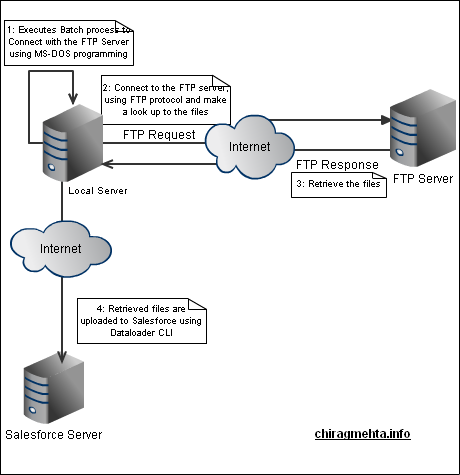
  1. Download Salesforce Data Loader Command Line Interface (Read more at http://wiki.developerforce.com/index.php/Using_Data_Loader_from_the_command_line)
  2. Write a Widows Batch file (.bat file)
  3. First command in the batch file will be connect to FTP server (ms-dos command ‘ftp’) and then get the necessary files from ftp server to the local folder.
  4. Second set of commands execute the Data Loader CLI jar and loads step3 retrieved file into Salesforce.
  5. To automate the execution of the batch, we can schedule the bat file execution using scheduled task feature of Windows operating system.

II – Java Web Service

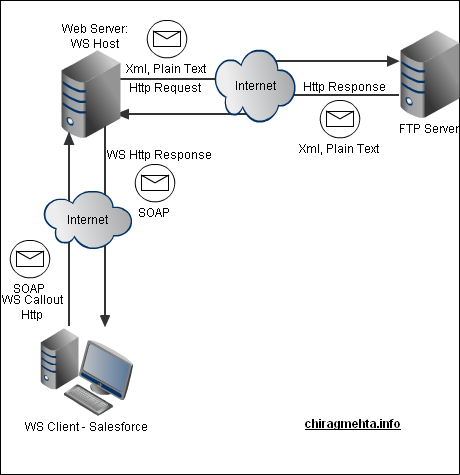
  1. Write a Java FTP client, expose it as a Web Service
  2. Consume above WS into your Salesforce Org using Apex “Browse WSDL” functionality

III – Http Request

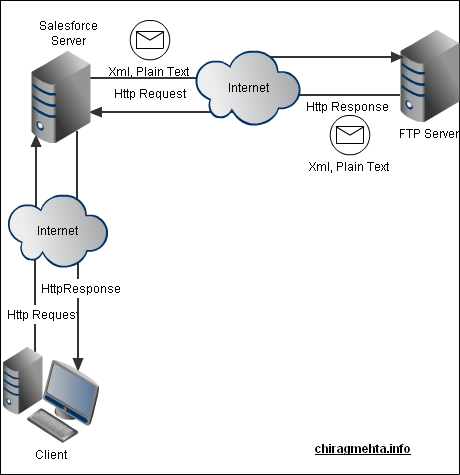
  1. Create a Http Request to the FTP server
  2. Handle the response using either of HttpRequest and HttpResponse Apex Class
  3. Ps: The problem that you can face is the size of the files. Please remember that HTTP Request size are currently limited to 100Kb of data, so larger exports would fail unless a mechanism was created to utilize multi-part transmissions.

How to configure Lotus Connect & Single Sign-On in a CITRIX Env

From last few days, I have been exploring  to find out how to configure(implement) Salesforce Lotus Connect & Single Sign-On in a CITRIX environment. Salesforce Support when contacted provided a displeased reply …

Case Description

Please highlight step by step process on how to configure (implement) Lotus Connect and Single Sign-On in a CITRIX enviornment

Case Comment from Salesforce

Unfortunately we do not support citrix, so I may not be able to fully assist you with your case.

1. – Lotus Notes – I unfortunately do not have any information regarding the installation of connect for lotus notes in a citrix enviroment. If you consult the web boards at Developer.Force.Com and Community.Force.Com you may be able to find more information.

2. -SSO – We do have information regarding SSO, but we do not have any specifically designed for citrix. This is the information we have:
https://na1.salesforce.com/help/doc/en/salesforce_single_sign_on.pdf
https://na1.salesforce.com/help/doc/en/sso_about.htm

Any possible solutions or workarounds on how to configure Lotus Connect & SSO in a citrix env?

Use Google Maps on a secure(https) page

User Problem
I’m including a Google Map on a page where users can sign up for a service. The page is accessed via SSL, and before I included the map, the entire page was transmitted securely. Now, however, browsers complain that portions of the page (the map) are transmitted insecurely. I understand the user information is still secure, but my users probably won’t.

How can I change this page so that the google map is still available and users may still interact with it, but the entire page is delivered via SSL?

Google words ..

Previously, when a Google Map was embedded in an encrypted web page, users would get a pop-up message saying the page included both secure and non-secure content. No one likes pop-up messages and the extra clicks they require

Google Solution

The Google Maps JavaScript API V2, Google Static Maps API, Google Maps API for Flash, and Google Maps API HTTP services can be accessed over a secure (HTTPS) connection by Google Maps API Premier customers. If the Google Maps APIs are used with a free Maps API key on a secure site, the browser may warn the user about non-secure objects on the screen.

Other possible tweaks

The easiest way would be to proxy the connection to Google Maps. Depending on how much the user interacts with google maps, this may be really easy or a little annoying.

You can use an SSL proxy script. I did that with a client’s site which uses the Enterprise License, and the client’s Google representative confirmed for us that it is OK to do it this way. I’m not sure if it is OK to do it with the free license, but I assume it is OK too.

Use Firefox which only shows a warning in the status bar

Have a custom link or button on the page that opens the map in a separate window. In our case the users did not want to see the map all the time. Therefore, I have the link on the relevant page and they can click it to open the map when they wish. They will still see the warning but only when they have to look at the map and not every single time they load the account page.

Implement Yahoo Maps instead, which has a simple querystring-based API to pass a location in, and retrieve an XML document containing a URL to a map image. Users can’t pan/zoom, but it’s a simple compromise, they can click a button to open a full map.

Callout from scheduled Apex not supported

Problem
Apex code with callouts doesnt works when scheduled. After requesting the debug logs, I could see the following:

EXCEPTION_THROWN|[45,19]|System.CalloutException: Callout from scheduled Apex not supported.

Solution

You need to use the @future annotation. Refer Salesforce Blog for an example

Webinar : Salesforce Chatter Developer Preview Tech Talk

http://wiki.developerforce.com/images/thumb/c/ca/Chatterlogo.gif/100px-Chatterlogo.gifSalesforce Chatter is a new collaboration platform that lets you build collaborative cloud-computing applications on Force.com, applications enhanced with rich user profiles, status updates, feeds for monitoring applications and users, and more. In this webinar you will:

Watch the webinar, and learn about Chatter Developer Preview:

  • Understand the rich and powerful Chatter features
  • Get to see a demo illustrating the value of Chatter
  • Learn about the tools for customizing your apps with rich social media

    Twitter experience anywhere on the web – @anywhere

    When Twitter was designed, they took a different approach—they didn’t require a relationship model like that of a social network. Keeping things open meant you could browse their site to read tweets from friends, celebrities, companies, media outlets, fictional characters, and more. You could follow any account and be followed by any account. As a result, companies started interacting with customers, celebrities connected with fans, governments became more transparent, and people started discovering and sharing information in a new, participatory manner.

    Twitter have developed a new set of frameworks for adding this Twitter experience anywhere on the web. Soon, sites many of us visit every day will be able to recreate these open, engaging interactions providing a new layer of value for visitors without sending them to Twitter.com.

    Our open technology platform is well known and Twitter APIs are already widely implemented but this is a different approach because we’ve created something incredibly simple. Rather than implementing APIs, site owners need only drop in a few lines of javascript. This new set of frameworks is called @anywhere

    http://2.bp.blogspot.com/_E8ZD85Wzu9E/S55jpJFFgUI/AAAAAAAAAqc/Ef47AzLrg4Y/s400/logos.png

    Above image lists initial participants who will be using the new Twitter experience over the web!

    Whitelist 34 different Salesforce IP Addresses

    Salesforce.com sends email from 34 different IP addresses. If your organization blocks any of these IP addresses, users might not receive all email sent from Salesforce.com.

    The Salesforce.com IP ranges are:

    • 202.129.242.64 to 202.129.242.65
    • 204.14.232.64 to 204.14.232.79
    • 204.14.234.64 to 204.14.234.79

    Whitelist above Salesforce.com IP ranges on organization’s email server. Whitelisting an IP address allows the email server to receive email from an IP address that might otherwise be blocked

    Google Introduces the Blogger Template Designer

    Google introduced the Blogger Template Designer | http://blogger.com/templates

    The Blogger Template Designer allows you to create effectively infinite number of designs templates instead of being restricted to a limited number of rigid designs by making it easy to customize your blogs design, layout, background and much more.

    Developing Web Services Using Apache Axis2 Eclipse Plugins

    Apache Axis2 Eclipse Plugins allow Web service developers to easily and speedily expose the available plain old Java applications as Web services.

    wso2.org lists a tutorial by Lahiru Sandakith which consists of two parts, with two examples that walk you through developing and deploying a sample Web service using the Top-down (Contract First) and Bottom-up (Code First) approach using Axis2 Eclipse Plugins.

    The tutorial is written for Eclipse SDK v3.2 and Axis2 Eclipse Plugin v1.3.

    Read the tutorial at http://wso2.org/library/1719

    « Older posts Newer posts »